STEMFYR PRESENTS
PODCAST · VIDEO · LIVESTREAMYour voice.
Your show.
Your studio.
StemCast brings podcast recording, video production, and professional livestream control into one focused Windows desktop app.
$5.99per month
Separate StemCast subscription
Windows 10/11Local project storagePodcast + live video
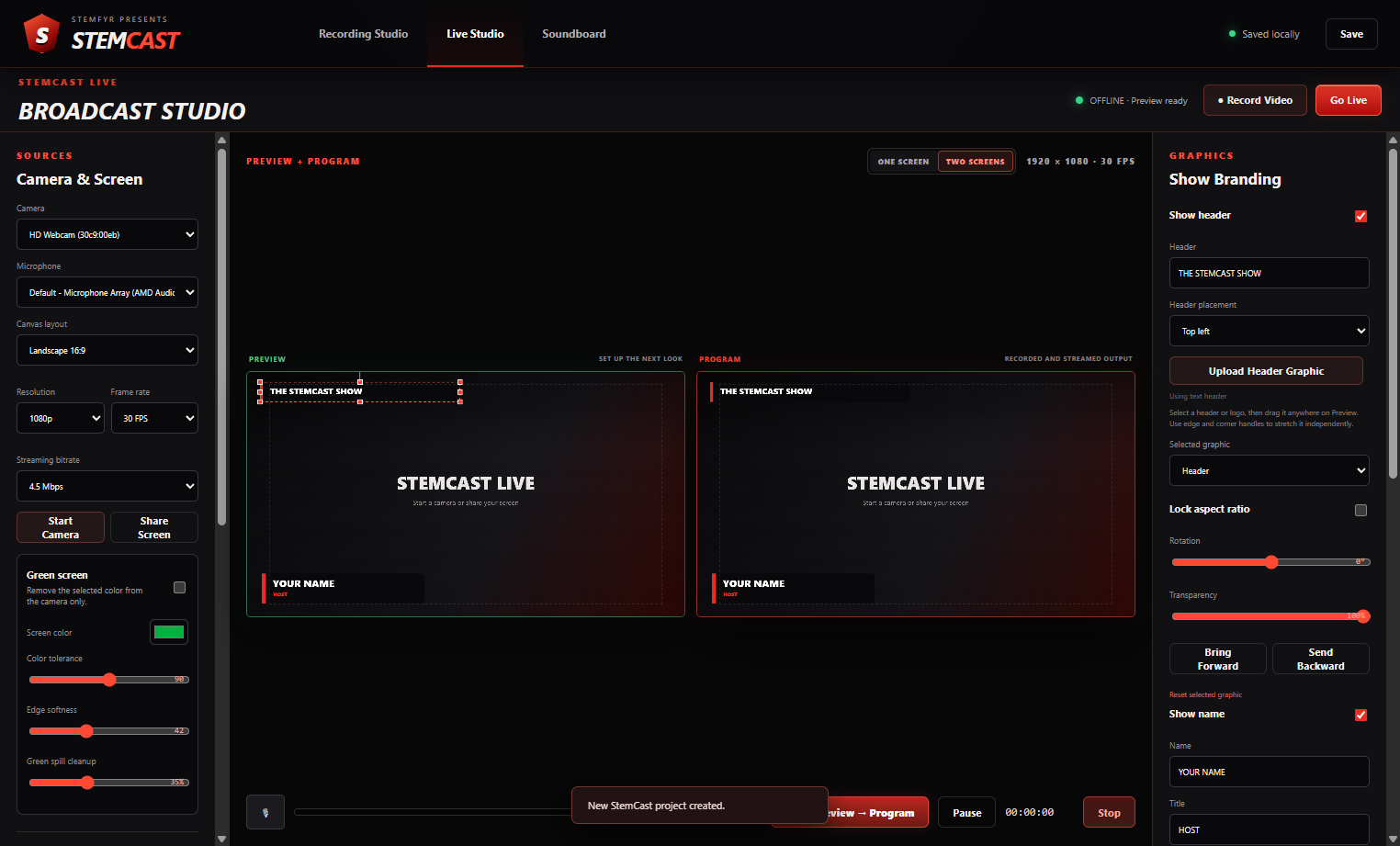
STEMCAST LIVE STUDIOPreview. Produce. Broadcast.
TWO STUDIOS. ONE WORKFLOW.
Record the episode.
Build the show.
Start from a dedicated launch screen, then enter the Recording Studio for podcasts or the Live Studio for broadcasts. Each workspace is designed around its job.
Multitrack podcast recording
Select microphones and audio interfaces, arm independent tracks, monitor levels, record video alongside audio, and see the waveform build while you speak.
Linked audio and video
Recorded audio and video share the same timeline position so playback, seeking, and edits stay together when you review the episode.
Non-destructive editing
Cut, copy, paste, split, trim, undo, and redo without overwriting the original recording. Autosave and recovery help protect the session.
Save, reopen, and export
Keep local episode projects, return to recorded work, play the finished podcast, and export audio or video when the episode is ready.
STEMCAST LIVE
A control room
for your audience.
Build a polished live show with a private preview, a clean program output, flexible scenes, and controls made for creators—not broadcast engineers.
- Choose a one-screen or two-screen workflow
- Camera, screen, image, video, and watch-along sources
- Picture-in-picture layouts for commentary
- Green-screen keying with live adjustment
- Movable, resizable headers, logos, and lower thirds
- RTMP streaming to supported platforms or a custom destination
PREVIEW PROGRAM
SET UP THE NEXT SCENEPrivate working view
WHAT YOUR AUDIENCE SEESClean broadcast output
HOST
STEMCAST LIVE · YOUR SHOW
SCENE 01WATCH ALONGGREEN SCREENLOWER THIRD
LIVE SOUNDBOARD
Put every cue
under your fingers.
Load your own intros, outros, ads, music, and effects onto ten DJ-style pads. Trigger them from the screen or the number keys while recording or broadcasting.
1INTRO2APPLAUSE3AIR HORN4BREAKING5LAUGH6TRANSITION7AD CLIP8OUTRO9CUSTOM0CUSTOM
BUILT FOR REAL RECORDINGS
Your work stays
under your control.
Core podcast recording, editing, project saving, and playback are designed to work locally without uploading private recordings.
Editing is non-destructive, and original takes remain available instead of being overwritten by timeline changes.
Saved RTMP credentials are encrypted locally and are not written into project exports or ordinary logs.
ONE STEMCAST PLAN
Record and broadcast
for $5.99 a month.
StemCast is a separate product and subscription from StemFYR Studios. The exact renewal terms will be shown by Microsoft Store before purchase.
STEMCAST FOR WINDOWS$5.99per month
- Podcast Recording Studio
- Live Studio and scene builder
- Video, graphics, and green screen
- Ten-pad custom soundboard
- Local projects and exports
- App updates while subscribed
WINDOWS DESKTOP RELEASE
The StemCast Store release
is in final submission.
The tested Windows package is connected to its official Microsoft Store product. Microsoft will make the download available after the listing and subscription pass certification.
Open Microsoft Store ↗Windows 10/11 · $5.99/month
Is StemCast part of StemFYR Studios?+
No. StemCast is a separate Windows desktop product built for podcasts, video recording, and livestream production. It has its own $5.99 monthly subscription.
Can StemCast record audio and video together?+
Yes. StemCast records video with the podcast and keeps audio and video aligned to the same playback position for review and editing.
Can I add my own graphics and sounds?+
Yes. The Live Studio supports custom headers and logos that can be moved and resized, plus ten soundboard pads for user-supplied audio.
Can I stream a video with my camera on top?+
StemCast supports watch-along video sources and picture-in-picture camera layouts. Use only media and streams you have permission to display or rebroadcast.
Is the Microsoft Store download live?+
The official StemCast Store product is in final submission. Microsoft will activate the download after certification is complete.